
Inputs → figure
Scientific Color Palette Generator
Choose categorical, sequential, or diverging palettes for figures. Preview the colors and copy HEX values, CSS, JSON, or plotting-language snippets.
Review the inputs and Create palette before viewing colors, copying code or downloading.
Example input
Start with a reproducible example
Self-authored, simulated teaching input for exploring this workflow. It is not a user’s research or a public gallery submission.
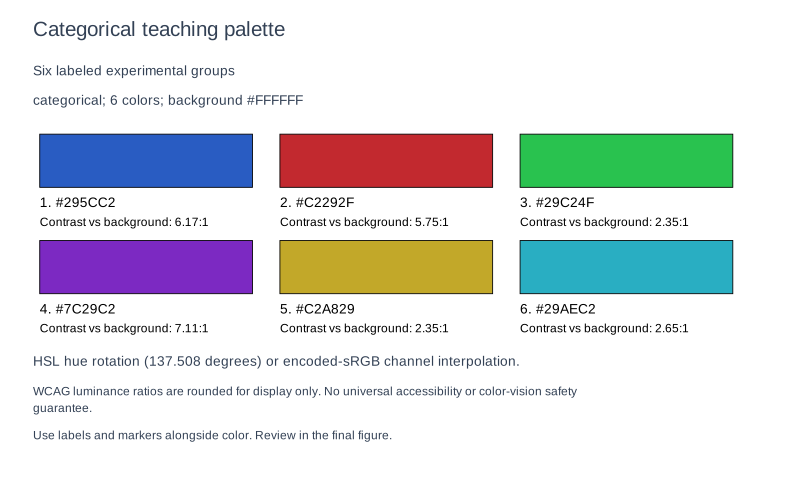
Six deterministic categorical colors, hue 220, white background. Verify HEX order, background contrast, approximate color-vision previews and matching export snippets.
Reviewed output · self-authored simulated input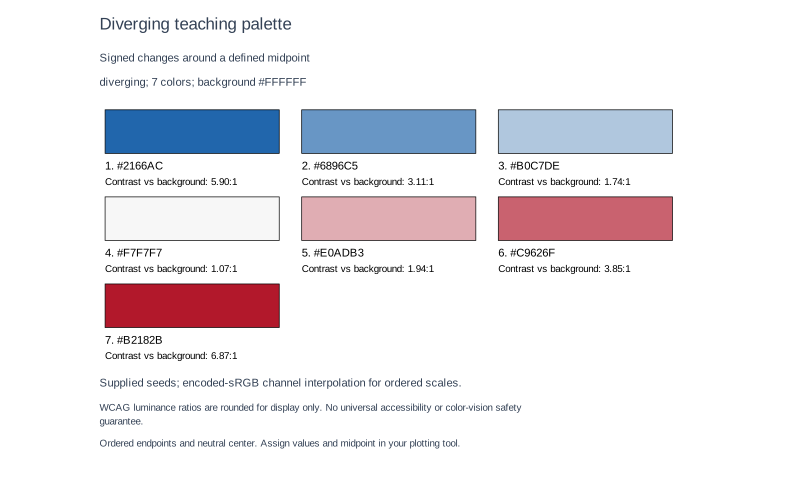
Seven colors using #2166AC, #F7F7F7, #B2182B on white; neutral fourth color. Encoded-sRGB interpolation is not perceptually uniform or an accessibility certification.
Reviewed output · self-authored simulated inputRead the example input
{
  "title": "Categorical teaching palette",
  "purpose": "Six labeled experimental groups",
  "mode": "categorical",
  "count": "6",
  "hue": "220",
  "background": "#FFFFFF",
  "seedColors": "",
  "caption": "Use labels and markers alongside color. Review in the final figure."
}
Use Load example to recreate the native figure and inspect its text, shapes and source values.
How to choose and apply a figure palette
The deterministic local engine creates 3–12 categorical, sequential or diverging colours. Without seeds, categorical colours use HSL saturation 65%, lightness 46% and successive hue offsets of 137.508 degrees. Ordered scales use HSL-derived endpoints and interpolate encoded sRGB channels, rounded to 8-bit values. Supplied categorical colours are used as entered; sequential seeds require two endpoints, and diverging seeds require three ordered endpoint/centre/endpoint colours.
The engine reports WCAG 2.2 relative-luminance contrast against an opaque supplied background. Optional protan, deutan and tritan previews apply the severity-1 Machado model using the published three-decimal Appendix A matrix coefficients in linear sRGB, then clamp and encode the result. These approximate previews are not perceptually uniform palette design, a medical simulation, or an accessibility certification. Use labels and redundant markers and review the final figure.
Why default palettes fail
Categorical modes distinguish groups, sequential modes show ordered magnitudes, and diverging modes represent values on both sides of a reference. The local generator uses HSL rules or supplied seeds; encoded-sRGB interpolation is not perceptually uniform or guaranteed monotonic in luminance. Assign data values and any midpoint in your plotting software.
Contrast and colour blindness
Contrast is calculated against the opaque background using WCAG relative luminance. Protan/deutan/tritan previews use a severity-1 matrix approximation at published three-decimal precision. Neither the ratios nor these approximations certify accessibility; inspect actual figure elements and add redundant cues.
Copy the values
After creating a valid palette, copy or download HEX, CSS, JSON, Python or R. Each format uses the same colour order and HEX values. Native SVG/PNG/PPTX/basic-Latin PDF boards retain colour swatches and text; editing input blocks old code and exports until you create again.
How to use this tool
- Choose categorical, sequential or diverging mode and an integer count from 3 to 12.
- Enter a hue from 0 to 360 or supply the required #RRGGBB seed colours, plus an opaque background.
- Create the palette and review colour order, HEX values and background contrast.
- Inspect optional colour-vision approximations and add labels or redundant visual cues.
- Copy or download HEX, CSS, JSON, Python or R code, or export the native colour-board figure.
Specifications and limits
- Status
- Local deterministic palette engine connected
- Types
- Categorical HSL or supplied colours; sequential/diverging encoded-sRGB channel interpolation
- Range
- 3–12 colours; exact #RRGGBB background and seeds; duplicate rounded colours rejected
- Code
- HEX/CSS/JSON/Python/R copy and file download; native SVG/PNG/PPTX/basic-Latin PDF colour board
- Accessibility
- WCAG background contrast and approximate protan/deutan/tritan previews; no accessibility or colour-vision safety certification
Guest native edits stay in this tab until you explicitly save a confirmed figure. Sign in to keep private works and revision history. Saved native works restore the figure and exports, not the original input form. AI tasks, images and references are private to their owner. Subscriptions and one-time packs are available for AI allowances. Native drawing and exports remain free. Understand export formats.
Frequently asked questions
Which palette types are planned?
Categorical, sequential and diverging modes are implemented locally. Select one explicitly before creating the palette.
Can I copy HEX, CSS, or JSON?
Yes. After Create, select HEX, CSS or JSON and use the copy or file-download action. Input changes invalidate the old code until you create again.
Are the colors guaranteed to be colorblind-safe?
No. Background contrast ratios and approximate protan/deutan/tritan previews support review but do not guarantee readability or accessibility. Use redundant labels, markers or line styles.
How many categories can I choose?
All three modes accept an integer count from 3 to 12. Choose fewer colours or better-separated seeds if 8-bit rounding would produce duplicates.
Can I use these colors in R or Python?
Yes. The generated Python list and R vector use the same HEX values as the colour board and other code formats.
Where do the palettes come from?
Colours come from the disclosed local HSL rules or your explicit seeds. Ordered scales interpolate encoded sRGB channels. Contrast follows WCAG luminance; colour-vision previews approximate the Machado severity-1 model at its published three-decimal table precision.