
Inputs → figure
PRISMA Flow Diagram Generator
Enter your identification, screening, and included counts. Check the arithmetic and create a PRISMA 2020 flow diagram with supported manuscript exports.
Native rendering runs in this tab · AI submissions are stored separately
SVG and PPTX retain native text and shapes. PDF currently supports basic Latin text. Check font substitution in your editor.
Example input
Start with a reproducible example
Self-authored, simulated teaching input for exploring this workflow. It is not a user’s research or a public gallery submission.
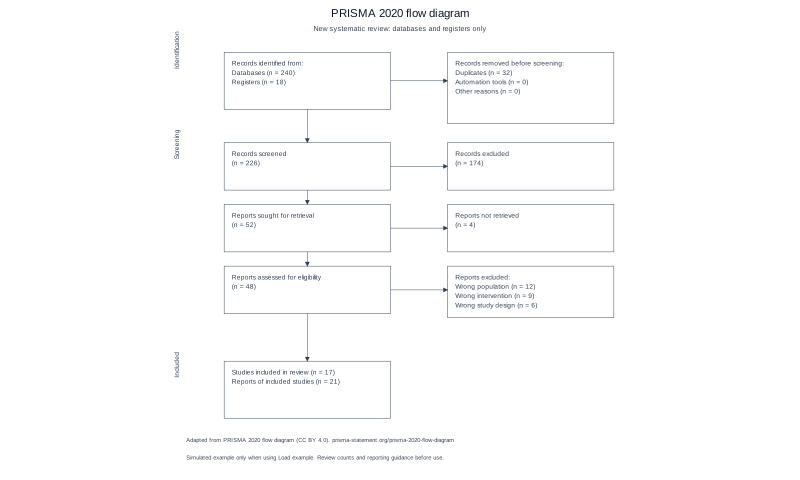
Use the filled stage-count example; keep records, reports and studies distinct.
Reviewed output · self-authored simulated input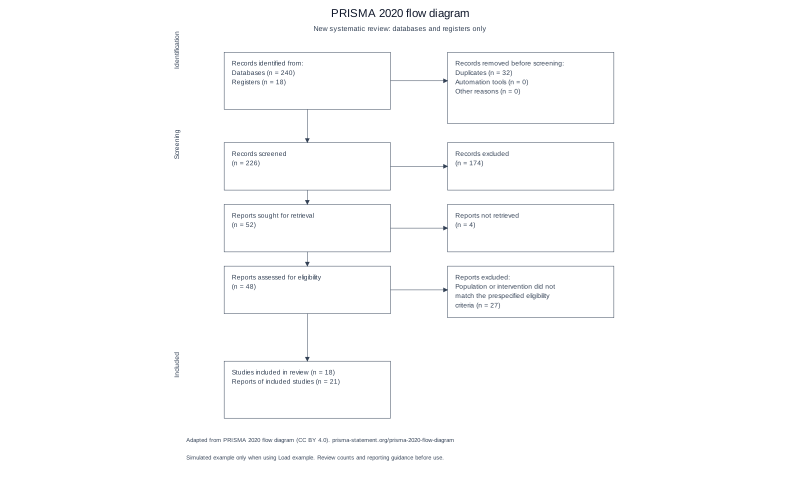
Use the same review with multi-line exclusion reasons and different study/report counts.
Reviewed output · self-authored simulated inputRead the example input
Records identified from databases: 240
Records identified from registers: 18
Duplicate records removed: 32
Records removed by automation tools: 0
Records removed for other reasons: 0
Records screened: 226
Records excluded: 174
Reports sought for retrieval: 52
Reports not retrieved: 4
Reports assessed for eligibility: 48
Exclusion reasons:
Wrong population | 12
Wrong intervention | 9
Wrong study design | 6
Studies included in review: 17
Reports of included studies: 21
Use Load example to recreate the native figure and inspect its text, shapes and source values.
How the PRISMA flow is checked
A PRISMA flow diagram follows the records found in a review through screening, retrieval and inclusion. Records, reports and studies are different units: one study can have more than one report. Keep those counts separate when you prepare the input.
Before drawing the diagram, check each transition against your review log. For example, 226 screened records minus 174 exclusions leaves 52 reports sought for retrieval. If a number is missing, leave it blank rather than entering zero. The engine flags differences; it will not decide which count is right.
What we check for you
Checks compare counts that represent the same flow stage, such as records screened against records excluded and reports sought against reports retrieved. Records, reports, and studies remain separate concepts; a mismatch is a prompt to review the source data, not a reason to invent a replacement value.
PRISMA 2020 vs the 2009 version
This page uses the PRISMA 2020 flow structure. The older 2009 diagram is useful historical context, but its labels and structure should not be substituted for the selected 2020 review and source variant.
When your numbers don't add up
A count difference can reflect a missing value, a different unit of counting, or an entry error. The tool displays the discrepancy and leave correction to the review team; blank values remain unknown rather than being treated as zero.
Using it for a systematic review
Use the diagram to communicate the review selection process after confirming each stage against your records. Check that exclusion reasons and the distinction between included studies and their reports match the review, then verify the final diagram against the applicable PRISMA guidance.
How to use this tool
- Enter the source and stage counts you have.
- Add removal and exclusion details where applicable.
- Review missing fields and any count differences.
- Generate the diagram and check every label.
- Export in a format enabled for the release.
Specifications and limits
- Framework
- PRISMA 2020: new reviews, databases and registers only. Updated reviews and other sources are not supported yet.
- Input
- Whole stage counts up to 1,000,000,000 and up to 12 exclusion reasons. Blank is unknown and blocks export.
- Validation
- Identification, screening, retrieval and eligibility arithmetic; studies and reports remain distinct.
- Formats
- Native SVG/PPTX, browser-rendered PNG and vector PDF with basic Latin text. Check font substitution in your editor.
Guest native edits stay in this tab until you explicitly save a confirmed figure. Sign in to keep private works and revision history. Saved native works restore the figure and exports, not the original input form. AI tasks, images and references are private to their owner. Subscriptions and one-time packs are available for AI allowances. Native drawing and exports remain free. Understand export formats.
Frequently asked questions
Is this based on PRISMA 2020?
Yes. The current local engine implements the PRISMA 2020 new-review flow for databases and registers only. Review it against the official template: https://www.prisma-statement.org/prisma-2020-flow-diagram
Does the tool support an updated review?
Updated reviews and other-source flows are not supported yet. Do not use this limited template to represent them.
What happens if my counts do not add up?
Related-count differences are shown by stage. Generation and exports stay blocked until you correct them; counts are never invented.
Can I leave a count blank?
A blank remains unknown. You can edit an incomplete form, but generating or exporting it is blocked until required counts are entered.
Can I edit the exported labels?
SVG and PPTX contain native text and shapes. PNG is a fixed image; PDF supports basic Latin text. Check the actual file and fonts in your editor.
Does a PRISMA diagram guarantee my review meets reporting guidance?
No. You must verify the counts, reasons, review type, and current reporting requirements yourself.