
Inputs → figure
CONSORT Flow Diagram Generator
Build a CONSORT 2025 participant flow diagram for a supported parallel-group trial, with stage counts, arithmetic checks, and manuscript exports.
Native rendering runs in this tab · AI submissions are stored separately
SVG and PPTX retain native text and shapes. PDF currently supports basic Latin text. Check font substitution in your editor.
Example input
Start with a reproducible example
Self-authored, simulated teaching input for exploring this workflow. It is not a user’s research or a public gallery submission.
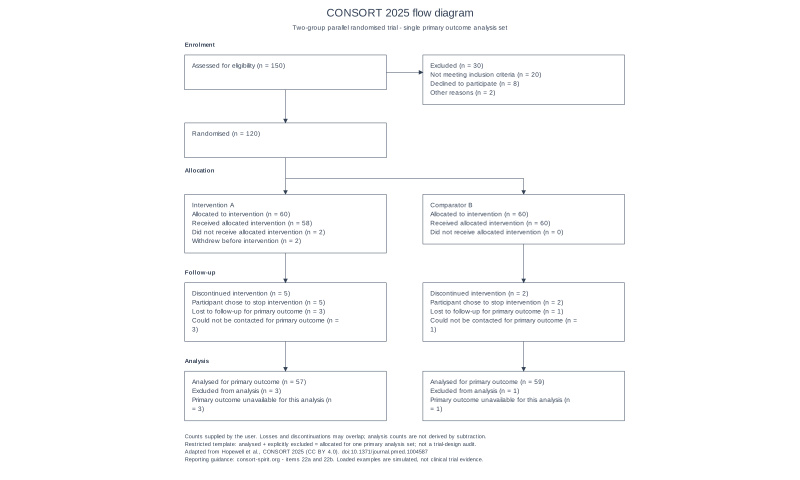
Use CONSORT 2025: 150 assessed, 30 excluded with supplied reasons, 120 randomised, 60 allocated per arm. Arm A: 58 received, 2 not received, 5 discontinued, 3 lost, 57 analysed and 3 excluded. Arm B: 60 received, 0 not received, 2 discontinued, 1 lost, 59 analysed and 1 excluded.
Reviewed output · self-authored simulated input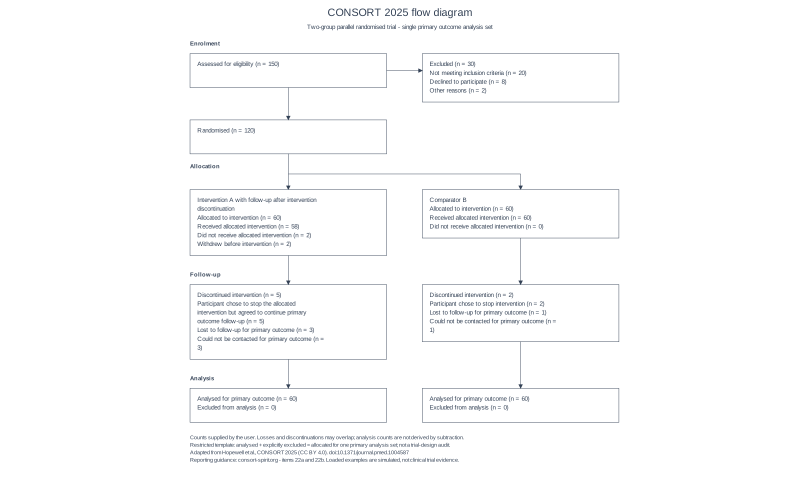
Use the same 60-per-arm trial with an expanded intervention label and discontinuation reason. Both groups have 60 analysed and 0 analysis exclusions despite separately reported loss and discontinuation; analysis counts are explicitly supplied, never obtained by subtraction.
Reviewed output · self-authored simulated inputMore reviewed outputs and model comparisons
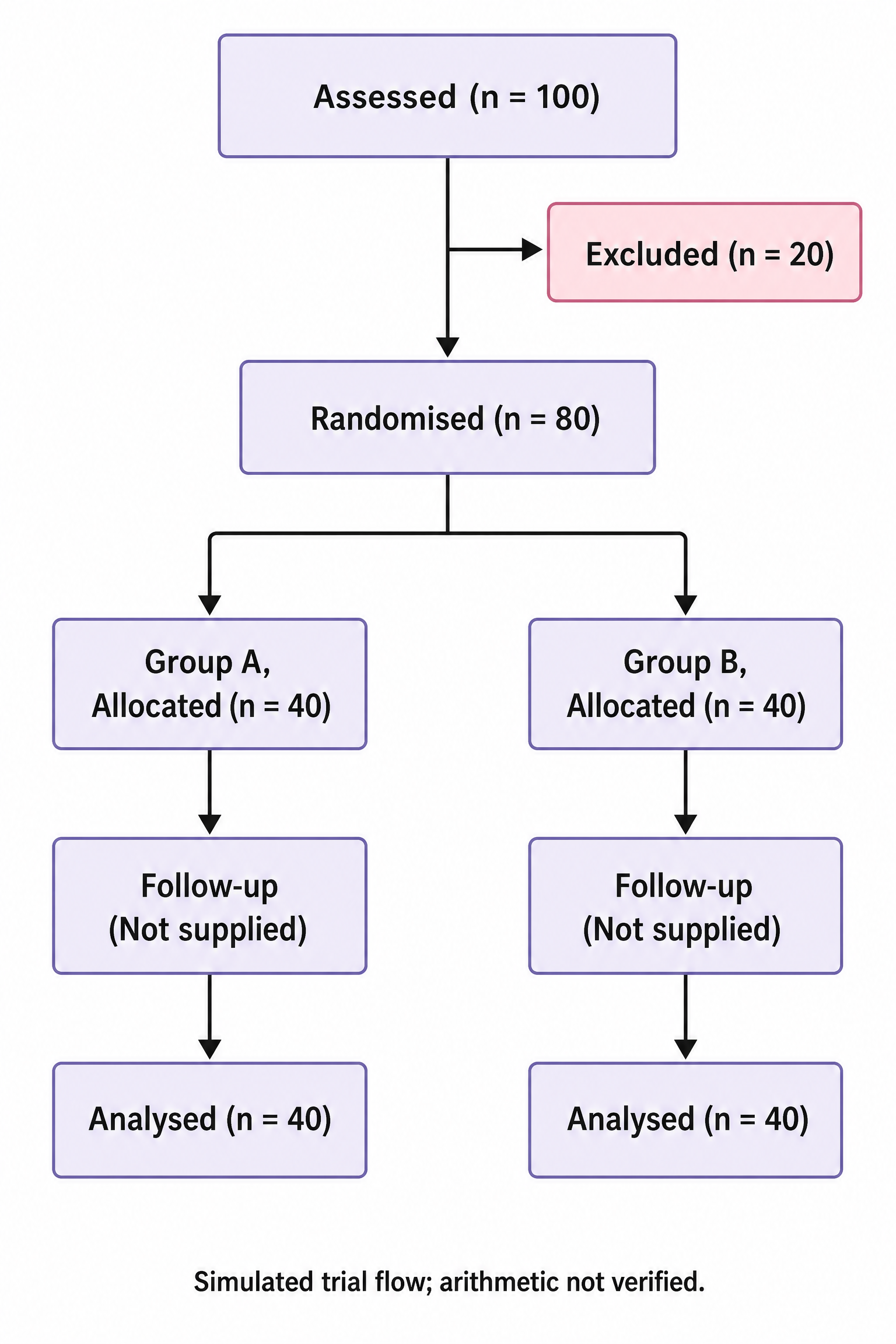
Self-authored simulated Image 2 2K, 2:3 example: 100 assessed, 20 excluded, 80 randomised, 40 allocated and 40 analysed per group; both follow-up counts remain Not supplied. All seven supplied numbers and the simulated/arithmetic-not-verified footer were visually checked. Raster illustration, separate from the native count validator.
Reviewed output · self-authored simulated inputRead the example input
{
  "assessed": "150",
  "excluded": "30",
  "exclusionReasons": "Not meeting inclusion criteria | 20\nDeclined to participate | 8\nOther reasons | 2",
  "randomised": "120",
  "arm1": {
    "label": "Intervention A",
    "allocated": "60",
    "received": "58",
    "notReceived": "2",
    "notReceivedReasons": "Withdrew before intervention | 2",
    "discontinued": "5",
    "discontinuedReasons": "Participant chose to stop intervention | 5",
    "lost": "3",
    "lostReasons": "Could not be contacted for primary outcome | 3",
    "analysed": "57",
    "analysisExcluded": "3",
    "analysisExcludedReasons": "Primary outcome unavailable for this analysis | 3"
  },
  "arm2": {
    "label": "Comparator B",
    "allocated": "60",
    "received": "60",
    "notReceived": "0",
    "notReceivedReasons": "",
    "discontinued": "2",
    "discontinuedReasons": "Participant chose to stop intervention | 2",
    "lost": "1",
    "lostReasons": "Could not be contacted for primary outcome | 1",
    "analysed": "59",
    "analysisExcluded": "1",
    "analysisExcludedReasons": "Primary outcome unavailable for this analysis | 1"
  }
}
Load the disclosed simulated illustration brief and review every label, connection and scientific detail. AI results vary between runs.
How the participant flow is checked
The local implementation follows CONSORT 2025 for a restricted two-group parallel trial and one primary outcome analysis set. Enter screening exclusions with reasons, randomisation, and each group's allocation, receipt, discontinuation, primary-outcome follow-up loss, analysis and analysis exclusions. Blank counts remain unknown and block creation in this template; CONSORT guidance permits adapting a flow diagram when counts are unavailable.
Reason totals are checked against their explicitly entered count. Allocation totals must match randomisation; received plus not received must match allocation. For the selected single primary analysis set, analysed plus explicitly excluded must equal allocated. Discontinuation and loss to follow-up may overlap and are never subtracted to infer analysis counts. These restricted-template checks do not audit trial design, intention-to-treat decisions or CONSORT compliance.
The separate Illustration mode uses Image 2 at 2K to create a raster draft from your supplied trial fields or brief. It does not run the native arithmetic checks, reconcile conflicting counts or verify CONSORT compliance. Unknown counts must remain unknown. Choose Precise Diagram for the checked two-group template and editable native exports; an AI illustration is a separate output.
What changed in CONSORT 2025
The implemented default uses CONSORT 2025 participant-flow stages, including primary-outcome follow-up loss and analysis counts. See the official CONSORT-SPIRIT explanations for items 22a and 22b. This two-group template does not claim to implement every trial extension.
What we check
Screening exclusions, allocation, intervention receipt and reason totals are checked locally. Analysed plus explicitly excluded must equal allocated for this one primary analysis set. Losses and discontinuations can overlap, so their sum is not used to derive analysis counts. Every count is required by this restricted template; that is not a universal CONSORT requirement.
Export for your manuscript
Native SVG, PNG, PPTX and basic-Latin vector PDF are connected in the current implementation. Check group labels, reasons, analysis population and the journal's requirements before using the figure.
Reporting reference: CONSORT 2025 participant flow. An AI illustration does not replace reporting guidance or the native count checks.
How to use this tool
- Enter all screening, exclusion-reason and randomisation counts; enter 0 explicitly.
- Enter distinct labels and allocation and receipt counts for both groups.
- Supply discontinuation, primary-outcome follow-up loss and their separate reasons.
- Enter the actual primary analysis counts and explicit exclusions; review any differences.
- Confirm Create after editing or applying an AI draft, then review the native export.
Specifications and limits
- Guideline
- CONSORT 2025 restricted two-group parallel template
- Analysis set
- One explicitly supplied primary outcome analysis set; no loss-based subtraction
- Checks
- Nonnegative whole counts, stage totals and explicit reason totals; blanks block creation
- Formats
- Native SVG/PNG/PPTX/basic-Latin vector PDF connected
- Illustration mode
- Separate Image 2 2K original PNG; optional permitted PNG reference; no verified count arithmetic or editable-vector layer
Guest native edits stay in this tab until you explicitly save a confirmed figure. Sign in to keep private works and revision history. Saved native works restore the figure and exports, not the original input form. AI tasks, images and references are private to their owner. Subscriptions and one-time packs are available for AI allowances. Native drawing and exports remain free. Understand export formats.
Frequently asked questions
Does this use CONSORT 2025 or 2010?
The implemented template uses CONSORT 2025. CONSORT 2010 remains historical context.
Which trial designs are supported?
This restricted template supports two-group parallel trials with a single primary outcome analysis set. Single-arm trials and specialised extensions are outside this implementation.
Are discontinuation and loss to follow-up the same?
No. A participant can discontinue an intervention and still provide outcome data or remain in analysis. Loss and discontinuation may overlap; enter both separately with reasons.
Can analyzed participants differ from allocated participants?
Yes. Enter the actual analysed and explicitly excluded counts. This template checks their sum against allocation for one primary analysis set; it never subtracts follow-up losses to manufacture an analysis count.
Will the generator check my study design?
No. Local arithmetic and structure checks do not evaluate trial design, analysis-population decisions or completeness of CONSORT reporting.
What export formats can I use?
SVG, PNG, native PPTX and basic-Latin vector PDF are connected.
Can I create an AI illustration of the trial flow?
Yes. Illustration is a separate Image 2 2K raster route from your supplied fields or brief. Review every count, reason and arrow yourself. It does not check arithmetic or establish CONSORT compliance, and its labels are pixels. The native Precise Diagram mode keeps its existing restricted-template checks and exports.