
Inputs → figure
Conceptual Framework Generator
Define constructs, relationships, and direction to create a conceptual framework diagram for your thesis or paper. Review the meaning of each link.
Native rendering runs in this tab · AI submissions are stored separately
SVG and PPTX retain native text and shapes. PDF currently supports basic Latin text. Check font substitution in your editor.
Example input
Start with a reproducible example
Self-authored, simulated teaching input for exploring this workflow. It is not a user’s research or a public gallery submission.
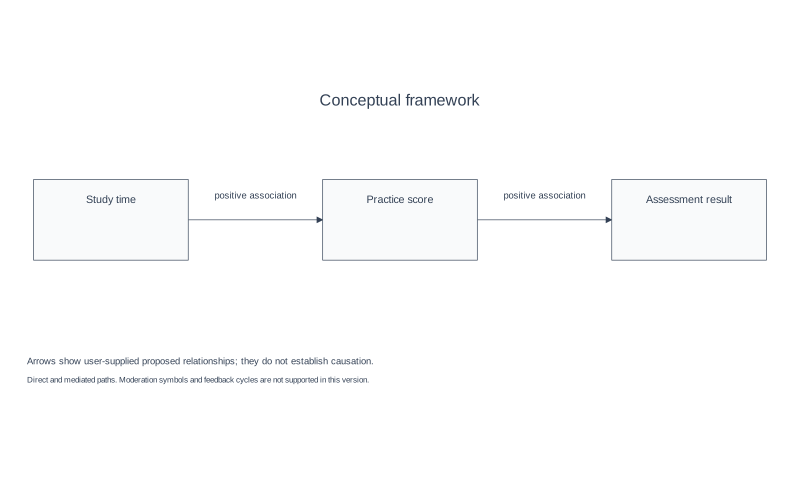
Use three user-supplied constructs and two directional relationships.
Reviewed output · self-authored simulated input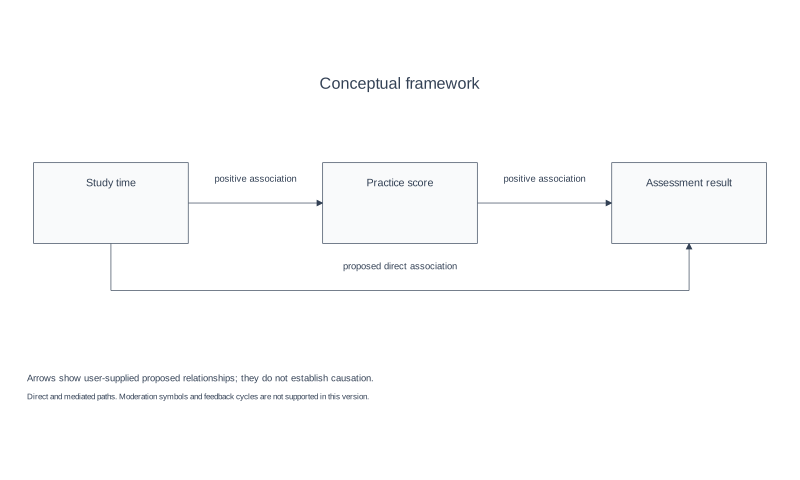
Add a user-confirmed indirect path with explicit relation semantics.
Reviewed output · self-authored simulated inputRead the example input
Constructs (ID | name):
X | Study time
M | Practice score
Y | Assessment result

Relationships (FROM -> TO | meaning):
X -> M | positive association
M -> Y | positive association

These simulated proposed relationships do not establish causation.
Use Load example to recreate the native figure and inspect its text, shapes and source values.
How constructs and links become a framework
The framework builder turns user-defined constructs and confirmed directional relationships into a native diagram. Each link keeps its supplied meaning. To show a mediated path, enter both links through the mediator. The current version does not support moderation symbols or feedback cycles.
A conceptual framework organizes a proposed model; it does not automatically supply a theoretical foundation or establish causation. Ambiguous links should be clarified before layout, and the resulting diagram should be reviewed for whether its symbols communicate the intended research claim.
Conceptual vs theoretical framework
A conceptual framework organizes the constructs and relationships used in a study; a theoretical framework explains the theoretical basis for those choices. A diagram can communicate a supplied model, but it does not select or justify a theory on the researcher’s behalf.
Direct, indirect and moderating paths
Direct and explicitly supplied mediated paths retain their labels and directions. Moderation symbols and feedback cycles are not supported in this version. Confirm every arrow and meaning before exporting; no relationship is inferred as causal.
Export and reuse
SVG and PPTX retain text and shapes as native objects. PNG is raster; PDF is vector with basic Latin text. Keep construct names and link meanings reviewable when reusing a framework, and check fonts and readability at the intended size.
How to use this tool
- List the constructs or variables in your model.
- Describe each relationship and its direction.
- Identify any mediator or moderator role you intend to show.
- Review the diagram labels and link meanings.
- Export in a format enabled for the release.
Specifications and limits
- Input
- 2–8 connected constructs, unique IDs/names; names up to 80 characters. Up to 12 directional links with meanings up to 60 characters.
- Relationships
- Direct and explicitly supplied mediated paths in an acyclic graph. Moderation symbols and feedback cycles are not supported yet.
- Inference
- Only supplied links are drawn; unknown variables, missing direction/meaning and duplicates are rejected. This is not a causal analysis.
- Formats
- Native SVG/PPTX, PNG and vector PDF with basic Latin text. Revise the fields and recreate the diagram before exporting.
Guest native edits stay in this tab until you explicitly save a confirmed figure. Sign in to keep private works and revision history. Saved native works restore the figure and exports, not the original input form. AI tasks, images and references are private to their owner. Subscriptions and one-time packs are available for AI allowances. Native drawing and exports remain free. Understand export formats.
Frequently asked questions
Is a conceptual framework the same as a theoretical framework?
They can be related, but a conceptual framework diagram does not automatically identify or justify a theory.
Can I show mediation and moderation?
Enter both directional links through the mediator to show a mediated path. Moderation symbols are not supported yet.
Will the tool decide which variables cause an outcome?
No. You provide or confirm the relationships; the diagram is not a causal analysis.
Can I change a relationship after generating the diagram?
Yes. Edit the constructs or relationships and create the framework again. Exports remain disabled while changes are unconfirmed or invalid.
How many variables can I add?
The current local version accepts 2–8 connected constructs with unique IDs and names, and up to 12 directional relationships.
Can I export the framework for a thesis?
SVG, PNG, native PPTX and basic-Latin vector PDF are available locally. Review the exported file and your institution’s requirements.